
Create digital product bundles in your store
Combine related digital products into one bundle, set a single price, and let buyers purchase the collection together. Add a previous price when you want CreatorStore to calculate and display the savings. 0% platform commission.
- Combine multiple digital products into one bundle
- Savings display based on the bundle and previous price
- Stripe and PayPal checkout
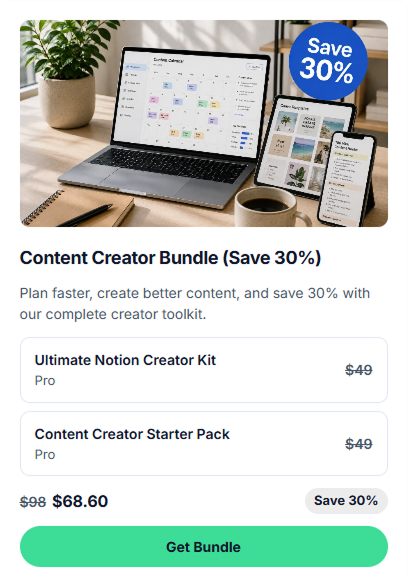
Examples of digital product bundles
Bundle products that already belong together, such as templates, presets, videos, PDFs, and other digital files. Here are a few common ways to organize a bundle:
Notion template collection
Templates grouped around a specific workflow, such as life planning, business operations, or content planning.
Figma UI kit bundle
A design system, component library, icon pack, and related templates for product teams or designers.
Lightroom preset packs
Presets grouped by mood or use case, such as portrait, travel, or film-inspired editing.
AI prompt library
A curated prompt library for a specific use case, such as marketing, coding, or writing.
Course + workbook combo
A video course combined with a workbook and supporting templates for a complete learning package.
Design asset bundle
Icons, fonts, mockups, textures, and other design assets grouped for a specific type of project.
How to create a digital product bundle
Set up the bundle card, checkout page, included products, price, and optional SEO fields before publishing.

Choose how your bundle shows up
Choose a card layout, upload the cover image, and add the title, subtitle, and button text. The live preview updates as you edit.
- Choose a card style and whether to show the image
- Preview storefront changes while editing
- Edit the title, subtitle, and button text

Set up the bundle page
Add the cover, gallery, description, and optional video. You can also add testimonials, your own guarantee terms, and FAQ content to explain what is included.
- Separate page or popup checkout format
- Content blocks for what is included and who it is for
- Testimonials with photo or initials and ratings
- FAQ for common buyer questions

Choose the products and set the bundle price
Select the digital products you want to include and set one price for the bundle. If you add the total price of the products sold separately, CreatorStore can calculate the savings. Buyers receive the included products through the bundle purchase. Save the bundle when it is ready to publish it to your store.
- Combine existing digital products in one bundle
- One bundle price + "was" price for savings display
- Automatically calculated savings from the bundle and previous price
- Included products are delivered through the bundle purchase
- Products stay sellable individually — bundle doesn't replace them

Add SEO details for the bundle page
Add a meta title, permalink, and description for the bundle page. The live preview helps you review how the page may appear in search results. You can also set a social image and preview how it may look when shared.
- Search snippet preview
- Social image with a preview for sharing
- Permalink generated from the title
14-day free trial · No card required
«Should I bundle or sell them separately?»
A common question: should you bundle products or keep selling them separately? Here is a quick look at when each option makes sense.

How your digital product bundle looks in your store
Once your bundle is published, buyers can see it as a card in your store and on its dedicated bundle page. Real example: creatorstore.co/@alex-creator.

Your bundle as a store card
The bundle appears on your CreatorStore page as a card with the cover image, title, subtitle, bundle price, and purchase button. If you add a previous price, the savings can also be shown on the card. Buyers can purchase from the card or open the full bundle page.
- Several card styles to choose from
- Bundle price + "was" price with auto-calculated savings on the card
- Displayed as part of your CreatorStore storefront

A dedicated page for your bundle
Every bundle has its own page and URL. The page can include the cover image, gallery, a list of included products, description, testimonials, guarantee, and FAQ. Each included product can be shown with its own image and description.
- Its own URL, own meta title and description
- SEO settings for the bundle page
- List of included products with images and descriptions
- Bundle page can include gallery, video, testimonials, guarantee terms, and FAQ
Example store — see how a bundle works for buyers
Digital product bundles — frequently asked questions
Answers to common questions about creating, pricing, selling, and delivering digital product bundles.
What is a digital product bundle on CreatorStore?
How many products can I combine in one bundle?
How does bundle pricing and the savings display work?
How do buyers download files from a bundle?
Can I still sell products individually if they're in a bundle?
Do I pay extra to sell digital product bundles?
Can I change the price of a bundle?
How do refunds work for bundles?
What's the best bundle discount to offer?
What kinds of digital product bundles can I sell?
Bundle related products.
Give buyers a clear reason to buy them together.
Set the bundle price, deliver the included products, and manage the offer from CreatorStore. 0% platform commission.